
★★★★★ 88 Google Reviews
Best of Bergen Winner 🏆
99% Client Retention Rate
Microsoft 365 Solutions for New Jersey Businesses
Microsoft 365 Solutions
Services Include: Microsoft 365 Business Premium • Exchange Online Migration • SharePoint Online • OneDrive for Business • Microsoft Teams • Microsoft Entra ID • Multi-Factor Authentication (MFA) • Conditional Access • Microsoft Defender • Compliance & Retention Policies • Microsoft 365 Copilot Readiness
Deploy, secure, and optimize Microsoft 365 with expert migration, compliance, cybersecurity, Copilot readiness, and ongoing support from Coban Computer Solutions.
Microsoft 365 Migration Services
Migrate to Microsoft 365 with expert Exchange Online, SharePoint Online, OneDrive for Business, Teams deployment, onboarding, and support.
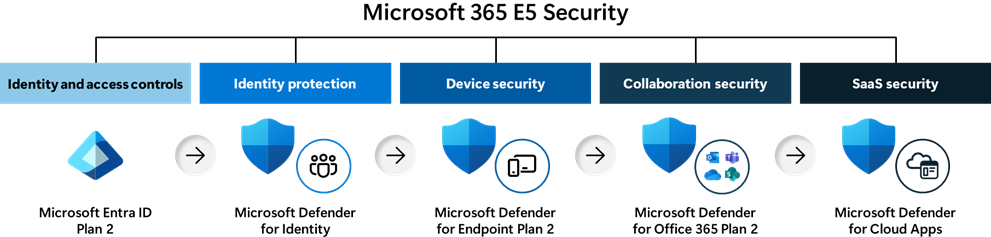
Microsoft 365 Security & Compliance
Protect your business with enterprise-grade Microsoft security solutions such as Defender for 365 and Cloud Backup.
Microsoft 365 Copilot Readiness Assessment
Prepare your organization for Microsoft 365 Copilot. CCS offers licensing options, security best practices, and user training.
Microsoft 365 Compliant Backup and Archiving
Secure Microsoft 365 backup, Exchange Online archiving, retention policies, legal holds, and compliance solutions for businesses and municipalities.
Microsoft GCC Support for Municipalities
Deploy, secure, and manage Microsoft GCC environments with expert support for municipalities, government agencies, and public-sector organizations.
Microsoft 365 SharePoint & OneDrive Solutions
Migrate, organize, secure, and manage business files using Microsoft 365 SharePoint Online and OneDrive for Business.
Microsoft 365 Migration Services
Seamless Microsoft 365 Migrations for New Jersey Businesses
Moving to Microsoft 365 can improve collaboration, security, mobility, and productivity throughout your organization. Coban Computer Solutions helps businesses migrate to Microsoft 365 with minimal disruption, ensuring email, files, user accounts, and collaboration tools are transferred securely and efficiently. Whether you’re moving from Exchange Server, Google Workspace, Hosted Exchange, POP3/IMAP, Dropbox, or traditional file servers, our team provides expert planning, deployment, and ongoing support.
Migration Services Include
- Exchange Online Email Migration
- Microsoft Teams Deployment
- SharePoint Online Migration
- OneDrive for Business Setup
- Microsoft Entra ID Configuration
- Multi-Factor Authentication (MFA)
- User & Group Migration
- File Server to Cloud Migration
- Google Workspace Migration
- End User Training & Onboarding
Why Move to Microsoft 365?
- Access email, files, and applications from anywhere
- Improve business continuity and disaster recovery
- Reduce on-premises server costs
- Strengthen cybersecurity with Microsoft security tools
- Enable secure remote and hybrid work
- Improve collaboration across departments
- Scale easily as your business grows
How We Make Microsoft 365 Work for Your Business
A Coban Computer Solutions engineer will assess your current environment, develop a migration strategy, securely transfer data and user accounts, implement best-practice security controls, and ensure your staff is prepared to work effectively in Microsoft 365. From planning through post-migration support, we help New Jersey businesses transition to Microsoft 365 confidently and securely.
Microsoft 365 Security & Compliance
Microsoft 365 ships with a security toolkit most small businesses are paying for and not using. CCS turns it on, configures it correctly, and manages it going forward
Why does this matter?
A default Microsoft 365 tenant is not a secure one. Multi-factor authentication isn’t enforced, admin accounts aren’t restricted, and file sharing permissions are left wide open. Most breaches CCS responds to didn’t come from a sophisticated attack — they came from a setting that was never configured. Getting this right at setup, rather than after an incident, is the difference between a manageable IT project and a business-stopping event.
What’s included:
- Multi-factor authentication enforced across every account
- Conditional access policies, so logins are evaluated by location and device, not just password
- Admin role restrictions, so no single account has more access than it needs
- Advanced threat protection for email, blocking phishing and malicious attachments before they reach an inbox
- Data loss prevention policies to stop sensitive information from leaving the organization by accident
- Audit logging, so account activity is tracked and reviewable
- Compliance configuration for HIPAA, SEC, and other regulatory retention and access requirements
Who needs this most?
Law firms, medical practices, financial and insurance offices, and any business holding client data with a legal retention obligation. If your industry requires you to prove where your data is and who touched it, this section of your Microsoft 365 tenant is not optional.
How CCS handles it
We start with a full audit of your existing tenant, flag every default or missing setting, and fix them on a schedule that doesn’t disrupt your team. From there, it’s ongoing — monitored and adjusted as Microsoft changes its own defaults and as your business adds people, devices, and applications.
Microsoft 365 Copilot
Microsoft 365 Copilot is an AI assistant built into Word, Excel, Outlook, Teams, and PowerPoint that drafts documents, summarizes email threads, builds spreadsheet formulas, and generates meeting notes using a business’s own Microsoft 365 data.
Why does this matter?
- Draft and edit documents in Word from a short prompt
- Summarize long email threads in Outlook and suggest replies
- Build formulas, analyze trends, and create charts in Excel without writing them manually
- Generate meeting notes and action items from Teams calls, including for anyone who missed the meeting
- Create a first-draft PowerPoint deck from a Word document or outline
Do I need a special license for Copilot?
Yes. Copilot requires an eligible Microsoft 365 plan and an add-on license per user. Not every existing 365 subscription qualifies, and licensing the wrong tier is one of the most common (and expensive) mistakes businesses make when rolling it out. CCS reviews your current licensing before you buy anything, so you’re not paying for seats that won’t actually work or won’t get used.
Is Microsoft 365 Copilot secure for my business?
Copilot is only as secure as the tenant it runs in. It reads with the same permissions as the person using it, which means any file or folder that’s over-shared becomes something Copilot can surface — a summer intern’s account pulling up payroll data, or a summarized answer built from a document that should have been restricted years ago. Copilot doesn’t create this risk. It exposes a risk that was already sitting in the tenant, and it does it faster and more visibly than a person searching manually ever would.
How CCS deploys Microsoft 365 Copilot
- Licensing review — confirming the right plan and add-on for your business, without overpaying for unused seats
- Permission audit — reviewing SharePoint, OneDrive, and Teams sharing permissions to fix over-shared files before Copilot can surface them
- Data classification — labeling sensitive files (financial records, HR data, client information) so Copilot respects those boundaries automatically
- Security baseline check — confirming MFA, conditional access, and admin role restrictions are in place before rollout
- Pilot rollout — testing with a small group first, so any permission issues surface in a controlled setting instead of company-wide
Microsoft 365 Copilot Permission Audit
Before Microsoft 365 Copilot is deployed, CCS performs a permission audit of SharePoint, OneDrive, Teams, and Microsoft 365 Groups to identify files and folders that may be overshared.
Many organizations discover that employees have access to information they were never intended to see. Copilot doesn’t create these permission issues. It simply makes existing access easier to discover.
Our permission audit identifies:
- Overshared SharePoint sites
- Excessive Teams access
- Guest user permissions
- Public sharing links
- Inactive SharePoint sites
- Ownerless Teams and Microsoft 365 Groups
SharePoint Cleanup & Data Governance
Microsoft Copilot performs best when business data is organized, current, and properly governed.
Before deployment, CCS reviews SharePoint and OneDrive storage to identify outdated content, duplicate files, broken permissions, and inactive sites. We also help businesses establish governance policies for sensitive information.
Our process may include:
- SharePoint site cleanup
- OneDrive review
- Document lifecycle policies
- Retention policies
- Sensitivity labels
- Data classification
- Legal hold requirements
- Compliance controls
Copilot User Training & Adoption
Purchasing licenses does not guarantee employee adoption.
CCS provides practical Microsoft Copilot training focused on real-world business scenarios, helping employees understand how to use Copilot effectively within Word, Excel, Outlook, Teams, and PowerPoint.
Training covers:
- Writing effective prompts
- Email productivity
- Document creation
- Meeting summarization
- Excel analysis
- Presentation development
- Security and compliance awareness
- AI best practices
Microsoft 365 Compliant Backup and Archiving
Microsoft 365 retains your data for a limited time — it doesn’t back it up. CCS adds independent, compliant backup and archiving so deleted, corrupted, or ransomware-hit data is always recoverable, no matter how much time has passed.
Microsoft 365 compliant backup and archiving is an independent, immutable copy of a business’s email, files, and Teams data, stored outside the native retention window Microsoft provides, so that data can be recovered and regulatory retention requirements can be met even after Microsoft’s own recycle bins and version history have expired.
Doesn’t Microsoft already back up my data?
No. Microsoft operates on a shared responsibility model: it guarantees the platform stays available, but the business is responsible for its own data. What Microsoft provides is retention, not backup — deleted emails typically live in the recycle bin for about 30 days, and deleted SharePoint or OneDrive files for up to 93 days. Past that window, the data is gone permanently. Retention policies are also built for compliance and e-discovery, not disaster recovery, so there’s no true point-in-time restore to a specific moment before data was lost or corrupted.
What can go wrong without independent backup?
- An employee accidentally deletes a folder and nobody notices until after the retention window closes
- Ransomware encrypts files, and the infection sits undetected longer than the retention period, so the “clean” version is gone by the time it’s discovered
- A compromised admin account is used to purge retained data on purpose
- An employee leaves the company and their mailbox or files need to be preserved for years, not weeks, for legal or compliance reasons
- A regulator or court requires records from a specific date that predates what Microsoft still has on hand
What’s included in CCS’s backup and archiving solution?
- Independent, immutable backup — a separate copy of Exchange, OneDrive, SharePoint, and Teams data, stored outside your Microsoft 365 tenant, that can’t be altered or deleted by anyone inside or outside your organization
- Point-in-time recovery — restore a single file, mailbox, or an entire workload to an exact moment before data was lost or corrupted
- Email archiving with multi-year retention — every incoming and outgoing email retained on a schedule that matches your industry’s legal requirements, commonly seven years for law, healthcare, and finance
- Encrypted storage — data protected with strong encryption both in transit and at rest
- Fast, granular restores — recover exactly what’s needed, down to a single email or file, without restoring an entire mailbox
Who needs this most?
Any business is exposed without it, but law firms, healthcare providers, financial services, and insurance agencies carry a legal obligation to retain records for a set number of years — typically seven. For these industries, Microsoft’s default retention windows fall well short of what regulators require.
How CCS sets this up
We assess your current retention configuration, identify the compliance gaps specific to your industry, and implement independent backup and archiving that runs quietly in the background — no changes to how your team works day to day, and no dependency on Microsoft’s own recycle bin as your only line of defense.
Microsoft GCC Support for Municipalities
Municipalities handle resident data, police records, and public funds under rules commercial businesses never face. CCS deploys and manages Microsoft GCC — Microsoft’s government-only cloud — so your township, borough, or agency meets those requirements without guessing.
Microsoft GCC (Government Community Cloud) is a version of Microsoft 365 built specifically for U.S. federal, state, local, and tribal government agencies, meeting compliance standards like FedRAMP Moderate, CJIS, and IRS 1075 that commercial Microsoft 365 does not.
Does my municipality need GCC instead of regular Microsoft 365?
If your township, borough, or agency handles resident records, law enforcement data, tax information, or any data subject to public records law, GCC is built for that in a way commercial Microsoft 365 isn’t. Commercial 365 has no government-specific compliance controls. GCC does — data stays in U.S. datacenters with added isolation from commercial tenants, and the platform is built to align with the regulatory frameworks municipalities are already required to follow.
GCC or GCC High — which one does a municipality actually need?
Most municipalities need standard GCC, not GCC High. GCC High is built for defense contractors and organizations handling ITAR-controlled or export-restricted data — it’s a different infrastructure entirely, and a much higher cost. The one exception is a police department or court system handling Criminal Justice Information (CJI): that data specifically falls under CJIS Security Policy, and depending on scope, may require GCC High. CCS reviews what your departments actually handle before recommending a tier, so you’re not paying defense-contractor pricing for a records department that doesn’t need it — or under-licensed for a police department that does.
What compliance standards does GCC cover for municipalities?
- FedRAMP Moderate — the baseline federal security standard covering most state and local government workloads
- CJIS — required for any department handling criminal justice information, including police, courts, and prosecutors
- IRS 1075 — required for departments handling federal tax information
- HIPAA — relevant for municipal health departments or agencies handling protected health information
What does CCS handle for a GCC deployment?
- Eligibility and licensing review — confirming your municipality qualifies for GCC and which departments need it
- Migration — moving existing email, files, and Teams data from commercial Microsoft 365 or legacy systems into the GCC environment
- Compliance configuration — setting up retention, access controls, and audit logging to match CJIS, IRS 1075, and other frameworks that apply to your departments
- Public records readiness — configuring retention and search so your municipality can respond to open records requests without a manual scramble
- Ongoing management — ongoing support and monitoring, so compliance holds up as staff, departments, and regulations change
Who should prioritize this?
Any municipal government, school district, or public agency handling resident data, tax records, or law enforcement information. Police departments and court systems in particular should have their CJIS scope reviewed before defaulting to standard GCC.
Microsoft 365 SharePoint & OneDrive Solutions
SharePoint and OneDrive replace the file server and the shared drive with something more secure and accessible from anywhere. CCS sets up the structure, permissions, and sync so your team’s files are organized, protected, and easy to find — not just moved to the cloud.
SharePoint and OneDrive are Microsoft 365’s file storage and collaboration tools — OneDrive for individual, personal file storage, and SharePoint for shared team and company-wide document libraries — that together replace a physical file server with cloud-based storage accessible from any device.
What’s the difference between SharePoint and OneDrive?
OneDrive is personal storage — think of it as an individual’s own drive, private by default, for files that belong to one person’s work. SharePoint is built for teams and departments: shared document libraries, company policies, project files, and anything multiple people need to access, edit, and control permissions on together. In practice, most businesses use both — OneDrive for individual work, SharePoint for anything shared.
Why move off a physical file server?
- No server hardware to buy, maintain, or eventually replace
- Files accessible from any device, in the office or remote, without VPN setup
- Automatic version history, so an overwritten or corrupted file can be rolled back
- Real-time co-authoring — multiple people editing the same document at once, without emailing versions back and forth
- Built-in redundancy across Microsoft datacenters, instead of a single point of failure sitting in a closet
What goes wrong when SharePoint and OneDrive aren’t set up properly?
Most businesses that move to SharePoint on their own end up with the same problems they had on a physical server, just in the cloud. Permissions get copied over as “everyone has access to everything.” Folder structures get built ad hoc, department by department, with no consistent logic. Search stops working because file and folder names were never standardized. None of this shows up as a problem on day one — it shows up two years later, when nobody can find anything and every new hire gets access to files they shouldn’t see.
What does CCS set up as part of a SharePoint & OneDrive deployment?
- Site and library structure — organized by department or function, matching how your business actually operates rather than a generic template
- Permission design — access scoped to what each role actually needs, not open by default
- Migration — moving existing files from a physical server, another cloud provider, or a tangle of personal drives, without losing folder structure or file history
- Sync configuration — OneDrive set up correctly on every device, so files are available offline and sync without conflicts or duplicate copies
- Version history and recovery — configured so accidental overwrites and deletions can be reversed
- Ongoing management — access reviewed and adjusted as employees join, change roles, or leave
Who benefits most from a proper SharePoint & OneDrive setup?
Any business still running a physical file server, or any business that’s already on SharePoint but struggling with permissions, duplicate files, or search that doesn’t return results. It’s also the foundation for Microsoft 365 Copilot working correctly — Copilot reads with the same permissions as the user, so clean SharePoint permissions aren’t optional if Copilot is part of the plan.
FAQs
What is Microsoft 365 Business Premium?
Microsoft 365 Business Premium is Microsoft’s all-in-one productivity and security platform for small and midsize businesses. It includes familiar apps like Outlook, Word, Excel, Teams, and OneDrive, plus advanced security features such as Microsoft Defender for Business, Conditional Access, device management, and email protection.
For organizations that need more than basic email and productivity tools, Business Premium helps secure company data, protect against cyber threats, manage employee devices, and support remote work from a single platform. Coban Computer Solutions helps businesses deploy, manage, and secure Microsoft 365 Business Premium to maximize productivity and cybersecurity.
Is Microsoft Copilot secure?
Yes. Microsoft Copilot for Microsoft 365 is built on Microsoft’s enterprise-grade security, compliance, and privacy framework. Your organization’s data remains within your Microsoft 365 tenant and is protected by existing permissions, compliance policies, and security controls.
Copilot does not use your business data to train public AI models, and users can only access information they already have permission to view. When properly configured, Microsoft Copilot can help businesses improve productivity while maintaining strong security and compliance standards. Coban Computer Solutions can help you deploy Copilot securely and ensure it aligns with your organization’s governance requirements.
Do I need Microsoft 365 backup?
Yes. While Microsoft 365 provides data resiliency and retention capabilities, it is not a complete backup solution. Accidental deletion, ransomware attacks, malicious actions, and long-term retention requirements can still put business data at risk.
A dedicated Microsoft 365 backup solution provides point-in-time recovery for emails, OneDrive files, SharePoint data, and Microsoft Teams content. This gives organizations greater control over data recovery and business continuity. Coban Computer Solutions helps businesses implement Microsoft 365 backup solutions that meet operational, compliance, and disaster recovery requirements.
What is Microsoft GCC?
Microsoft GCC (Government Community Cloud) is a specialized Microsoft 365 environment designed for U.S. federal, state, local, tribal, and territorial government agencies, as well as eligible government contractors.
Microsoft GCC provides enhanced security, data residency, and compliance controls that support requirements such as CJIS, CMMC, NIST, and other regulatory frameworks. Organizations handling sensitive government information often choose GCC to meet contractual and compliance obligations. Coban Computer Solutions specializes in Microsoft GCC environments and helps government agencies and contractors securely deploy, migrate, and manage Microsoft 365.
Can Coban Computer Solutions migrate us from Google Workspace?
Yes. Coban Computer Solutions provides complete Google Workspace to Microsoft 365 migration services for businesses, government organizations, and nonprofit organizations.
Our migration process includes email, calendars, contacts, Google Drive files, shared drives, user accounts, Microsoft Teams setup, security configuration, and user training. We carefully plan and test every migration to minimize downtime and ensure your team can quickly transition to Microsoft 365 with confidence. Whether you have 5 users or 500 users, we can help make your migration secure, efficient, and seamless.
Client Testimonials
Ready To Transform Your Company’s IT Network?
FAQs
What is included in a Microsoft 365 migration?
A Microsoft 365 migration typically includes Exchange Online email migration, SharePoint Online setup, OneDrive data migration, Microsoft Teams deployment, security configuration, and user onboarding.
Why should my business use Microsoft 365 Business Premium?
Microsoft 365 Business Premium combines email, collaboration, device management, cybersecurity, identity protection, and productivity tools in a single platform.
What security features are included in Microsoft 365?
Microsoft 365 includes Multi-Factor Authentication (MFA), Conditional Access, Microsoft Defender, data encryption, identity protection, and compliance tools.
What is Microsoft 365 Copilot?
Microsoft 365 Copilot is an AI-powered assistant that helps users create content, summarize information, analyze data, and improve productivity.
What is Microsoft GCC?
Microsoft Government Community Cloud (GCC) is a secure Microsoft 365 environment designed for municipalities, government agencies, and organizations supporting government operations.
What is the difference between SharePoint and OneDrive?
OneDrive is designed for individual file storage and sharing, while SharePoint is built for team collaboration, document management, and organizational knowledge sharing.
Why choose Coban Computer Solutions for Microsoft 365 support in New Jersey?
Coban Computer Solutions helps New Jersey businesses deploy, secure, and manage Microsoft 365 with expert migration, cybersecurity, compliance, SharePoint, Teams, Copilot, and ongoing support services and has a proven track record supporting over 100 organizations with their Microsoft 365 needs.