
Data backup is one of the most important and most overlooked parts of running a small business. When data loss happens, whether from ransomware, a server crash, accidental deletion, or a physical disaster like fire or flood, most business owners face the same four questions at once: How do we recover? How do we keep operating? How do we reach our clients? And how do we protect our reputation?
This guide covers why small business data backup matters in 2026, the most common ways NJ businesses lose data, what a reliable backup solution actually looks like, and what to ask a managed IT provider before you sign anything.
If your business operates in Bergen, Hudson, or Passaic County and you have not tested your backup recently, or do not have one at all, this is the place to start.
Most small business owners have a list of things they worry about.
Payroll.
Finding good employees.
Keeping clients happy.
Data backup rarely makes the list until the day it becomes the only thing on the list.
That is the problem.
Data loss is one of the most expensive, disruptive things that can happen to a small business, and it is almost always something the owner never saw coming. The questions that follow are brutal:
How do we recover?
How do we keep operating? How do we reach our clients?
What does this do to our reputation?
This post answers those questions before disaster forces you to. And if you are already thinking about managed IT backup for your small business, we will show you exactly what to look for.
The Ways Small Businesses Lose Data (and Why It Happens Without Warning)
Data loss does not look the same every time. That is what makes it so hard to prepare for if you are not intentional about it.
Jim Coban, who has been providing managed IT services to small businesses in Bergen, Hudson, and Passaic Counties for years, hears the same thing over and over: business owners know in the back of their minds that data loss is a risk, but they do not think it will happen to them. Then it does.
Here are the most common ways small business data disappears.
Ransomware Attacks
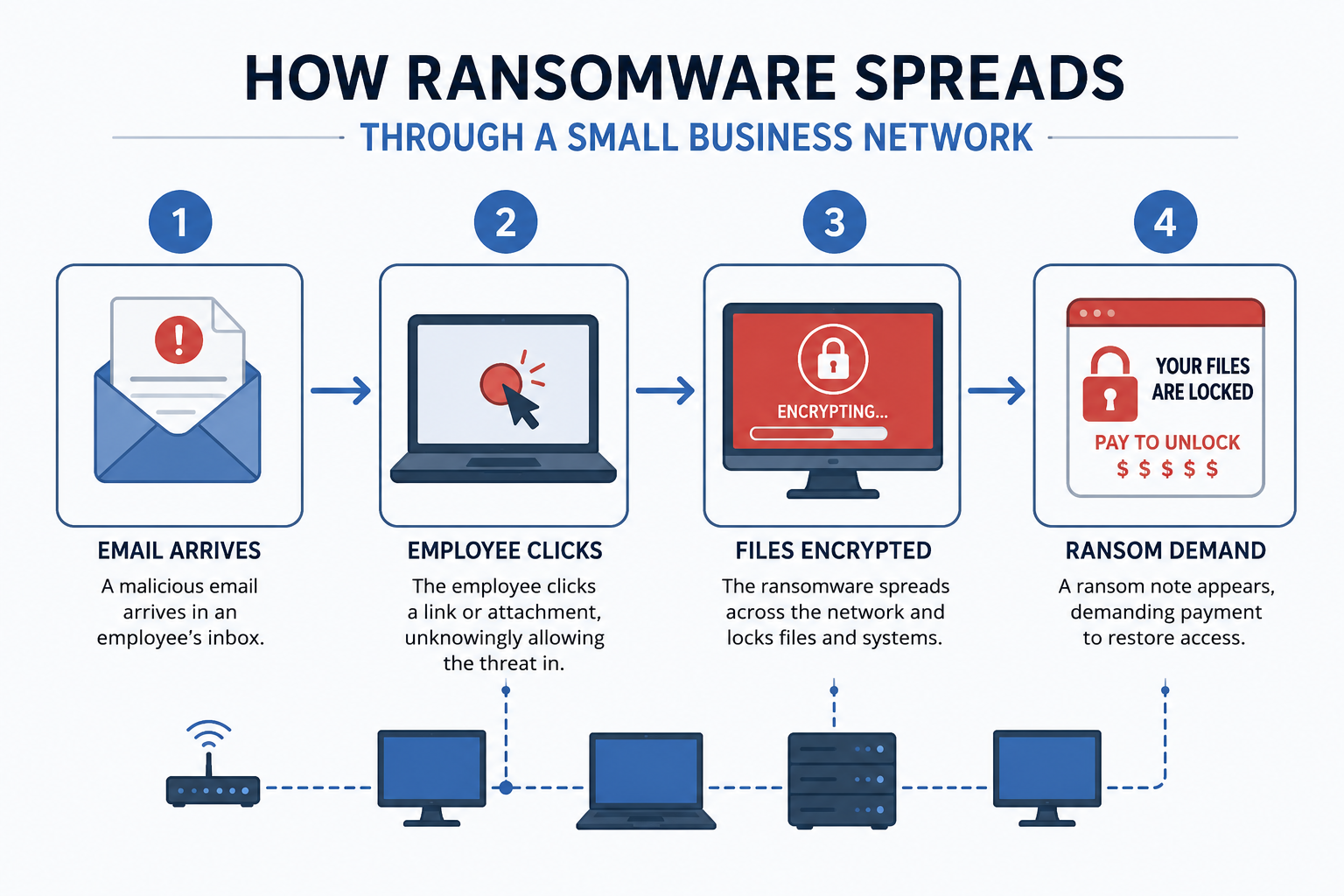
Ransomware is malicious software that locks you out of your own files and demands payment to restore access. These attacks have become more frequent, more sophisticated, and more targeted at small businesses precisely because small businesses often lack the defenses that larger companies have.
According to IBM’s 2024 Cost of a Data Breach Report, the average cost of a ransomware attack reached $5.13 million globally. Small businesses cannot absorb that. Many do not survive it.
A verified, recent backup is the only thing that lets you recover from ransomware without paying the ransom and hoping the criminals actually restore your data.
Data Breaches
A data breach occurs when someone unauthorized accesses your business data, often client records, financial information, or employee data. In New Jersey, the New Jersey Identity Theft Prevention Act requires businesses to notify affected individuals when a breach occurs. That notification process has a cost, and so does the reputational fallout.
A backup does not prevent a breach, but it does ensure that the data you need to continue operating is still accessible and intact while you deal with the fallout.
Server Crashes and Hardware Failure
Hard drives fail. Servers overheat. RAID arrays that were supposed to protect you can fail in ways that take the backup with them. Hardware failure is not rare; it is statistically inevitable over enough time. The question is whether your business data survives it.
Accidental Deletion and Human Error
Someone deletes the wrong folder. A file gets overwritten. A software update corrupts a database. Human error accounts for a significant percentage of data loss events, and it is the quietest one because there is no dramatic moment. You just cannot find the file.
Without versioned backups, that file is gone.
Physical Disasters: Fire, Flood, Theft, Vandalism
This one is easy to dismiss because it feels unlikely. Then a pipe bursts in the ceiling above the server room. A fire starts in the neighboring unit. Someone breaks in and takes the equipment.
Physical disasters wipe out on-site backups along with the primary data. This is exactly why offsite and cloud backup matter, and it is exactly why businesses in a dense area like Bergen County or Hudson County should not rely on a single backup location.
The Four Questions Every Business Owner Should Be Able to Answer
Jim frames data backup around four questions. If you cannot answer all four, your backup strategy has a gap.
1. How will we recover? Not “do we have a backup.” How, specifically, will you restore your data? What is the process? Who handles it? How long does it take?
2. How will we continue business operations? If you cannot access your data for 24 hours, 72 hours, or a week, what happens? Which operations stop? Which clients are affected? Most businesses have not mapped this out.
3. How do we keep in contact with our clients? If your email, CRM, and contact database are inaccessible, how do you reach people? What do you tell them? This question alone has caused businesses to lose clients permanently.
4. How do we protect our reputation? A data loss event that affects your clients becomes their problem too. How you handle it determines whether they stay or leave. Businesses that recover quickly with minimal client impact are the ones that survive the reputational hit.
If your current backup situation leaves any of those questions unanswered, that is the starting point for the conversation.
What Good Small Business Data Backup Actually Looks Like
The 3-2-1 backup rule is the baseline. Three copies of your data, on two different media types, with one stored offsite. It is not complicated in concept, but executing it consistently is where most small businesses fall short.
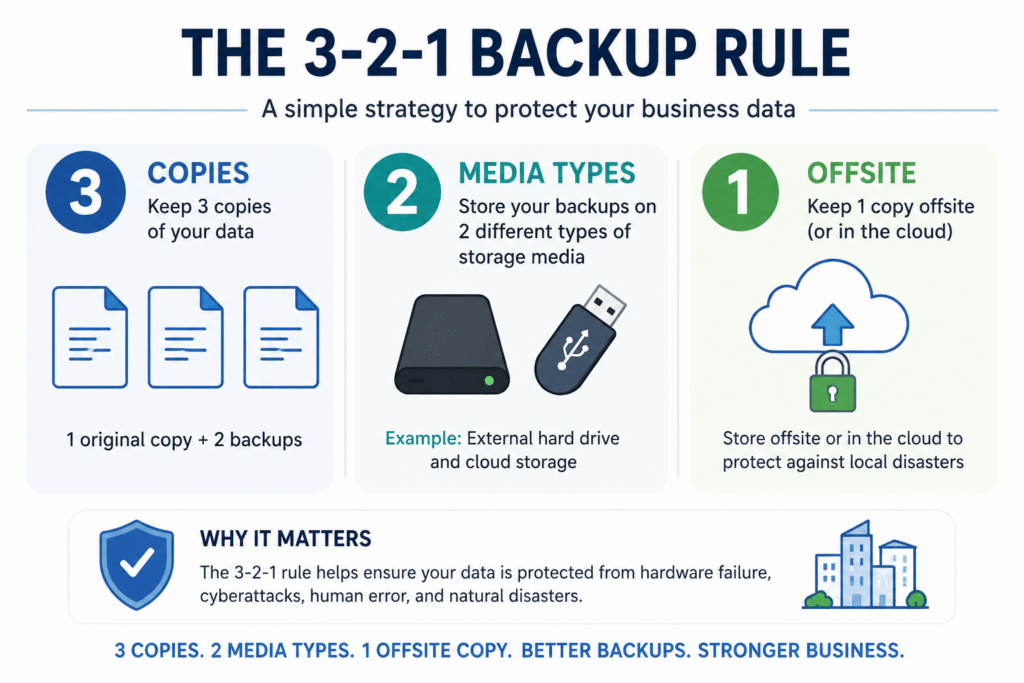
Here is what good backup looks like in practice for a small business in NJ:
Automated Daily Backups
Manual backups get skipped. Automated backups run whether anyone remembers or not. Your backup solution should run on a schedule you set and confirm without requiring a person to physically initiate it.
Offsite and Cloud Storage
On-site backups protect against accidental deletion and hardware failure. They do not protect against fire, flood, or theft. Cloud-based backup ensures your data is geographically separated from your office, which is the only way to survive a physical disaster at your location.
Tested Recovery
A backup you have never tested is a backup you cannot trust. Reputable managed IT providers in NJ run regular recovery tests to confirm that backed-up data can actually be restored in the timeframe your business needs.
Defined Recovery Time Objectives
How fast do you need your data back? The answer should be a number, not “as fast as possible.” A dental office in Ridgewood that cannot access patient records for 48 hours has a different problem than a solo consultant who can work from a laptop for a few days. Your backup strategy should match your actual business requirement.
Data Backup for Small Businesses in NJ: What to Look For in a Provider
If you are outsourcing your backup to a managed IT provider, here is what separates a solid solution from a checkbox.
Local presence matters. A managed IT company in Bergen County can be on-site if there is a physical issue. Remote-only support has limits when hardware is involved.
Ask about retention periods. How far back can you restore? If ransomware sat dormant in your system for 30 days before activating, a seven-day backup retention does not help you.
Ask about encryption. Your backed-up data should be encrypted both in transit and at rest. If a provider cannot confirm this, keep looking.
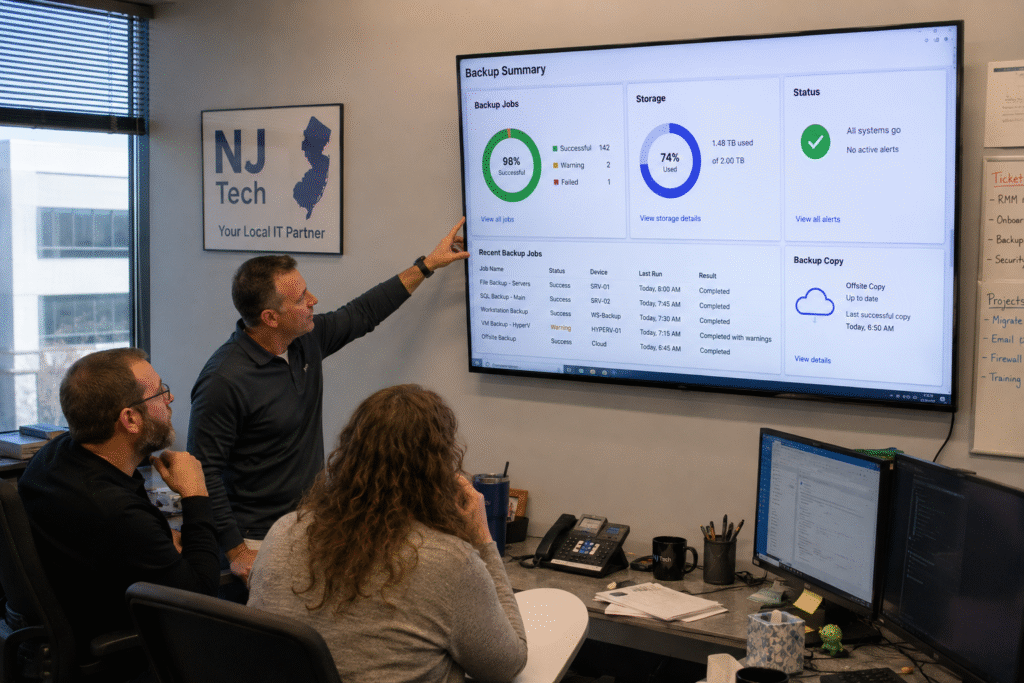
Ask about monitoring. Does someone actively watch for backup failures, or do you find out the backup was broken when you actually need it?
At Coban Computer Solutions, our small business data backup service is built around these requirements. We have been serving businesses in Bergen, Hudson, and Passaic Counties since 1992, and data backup is one of the first things we address with every new client because it protects everything else we do for them.
The Real Cost of Not Having a Backup
Let’s be direct about what data loss actually costs a small business. These numbers are not meant to scare you. They are meant to help you make the comparison clearly.
According to FEMA, approximately 40 to 60 percent of small businesses never reopen after a major data loss event. Businesses that do reopen often see significant client attrition during the recovery window.
Direct costs include data recovery services (which can run from a few hundred to tens of thousands of dollars depending on severity), downtime costs (the revenue you cannot generate while systems are down), and notification and legal costs if client data was involved.
Indirect costs include the time your team spends on recovery instead of billable work, the clients who leave during the disruption, and the reputational signal that your business is not prepared.
A managed backup solution for a small business in NJ typically runs well under $200 per month depending on data volume and requirements. Set that against the cost of a single major data loss event and the math is not close.
Frequently Asked Questions About Small Business Data Backup
How often should a small business back up its data?
At minimum, daily. Businesses that handle transactions, client communications, or project data in high volume should consider backups more frequently, up to every few hours for critical systems. The right frequency depends on how much data you can afford to lose between backups.
Is cloud backup enough, or do I also need a local backup?
Both. Cloud backup protects you against physical disasters at your location. Local backup protects you against internet outages and allows faster local restores. The 3-2-1 rule exists for exactly this reason.
What is the difference between backup and disaster recovery?
Backup is the process of copying your data. Disaster recovery is the full plan for getting your business operational after a loss event, including backup restoration, hardware replacement if needed, communication with clients, and return to normal operations. Good backup is a component of disaster recovery, not a substitute for a plan.
Does my business need backup if we use cloud-based software like QuickBooks Online or Microsoft 365?
Yes. Cloud software providers protect their infrastructure, not necessarily your specific business data. Microsoft 365, for example, has a recycle bin with limited retention. If data is deleted or corrupted beyond that window, it may not be recoverable without a separate backup. Your cloud applications should be backed up independently.
How do I know if my current backup is actually working?
Ask your IT provider to show you a completed restoration test. If they cannot, or have not run one recently, that is the answer. Backup monitoring should produce regular reports showing backup completion status, file counts, and any errors.
The Bottom Line
Data loss is not a theoretical risk for small businesses in NJ. It is a practical one, and the businesses that treat it seriously before it happens are the ones that continue operating when it does.
The four questions Jim raises are worth sitting with: How will you recover? How will you keep operating? How will you reach your clients? How will you protect your reputation?
If any of those questions do not have a clear answer, that is the starting point.
Coban Computer Solutions has been managing IT for small businesses in Bergen, Hudson, and Passaic Counties since 1992. Our small business data backup services are built around your actual recovery needs, not a one-size package.
Contact us to talk about what your backup situation looks like today and what it should look like.