
Answer up front: IT support for accountants has to be planned around two hard peaks rather than an average week. Do infrastructure work between May and August, size your support coverage to April rather than July, enforce multi-factor authentication on every account, and test a restore before the season starts. The FTC Safeguards Rule also requires a written information security plan.
Every industry says downtime is expensive. For an accounting firm it is expensive on a schedule you cannot move.
The deadline does not care, your clients all call the same afternoon, and there is no version of April 14 where you catch up tomorrow. That single fact should shape how a CPA firm buys and plans technology, and mostly it does not.
Plan around your peaks, not around an average week
Most IT proposals are written as though every week looks the same. Yours do not. A North Jersey firm has two hard peaks: mid-January through April 15, and the September and October extension deadlines. The rest is comparatively calm.
Two consequences.
Do infrastructure work in the calm months. Server replacements, cloud migrations, workstation refreshes, rewiring. All of it belongs between May and August. If a provider proposes a migration in February, that tells you something about how well they understand your business before you have to find out the harder way.
Buy coverage sized to the peak. A four-hour response target is fine in July and unusable on April 10. Ask specifically what happens to response times during your busy season, and get the answer in the agreement rather than in a sales conversation.
The same logic applies to hardware. A workstation you are not confident about in November is a workstation you replace in November, not one you hope survives until May.
The compliance piece most firms have not actually done
This is the part that surprises firms, so it gets its own section.
Under the Gramm-Leach-Bliley Act, the FTC treats tax return preparers as financial institutions, which makes them subject to the Safeguards Rule at 16 C.F.R. Part 314. That rule requires a written information security program. The IRS publishes Publication 4557, Safeguarding Taxpayer Data, which states that tax return preparers must create and enact security plans to protect client data, points to Publication 5708 for building the written plan, and warns that failing to do so may result in an FTC investigation.
Firm size is not an exemption. A sole practitioner carries the same obligation as a fifty-person firm.
The IRS is also direct about why: identity thieves target tax professionals specifically because of the client data they hold, and stolen preparer data produces fraudulent returns that are harder to detect.
What we find in practice. Most small firms we assess fall into one of three categories. Some have no written plan at all. Some have one a vendor generated years ago that nobody has read and that does not describe what the firm actually does. A minority have a current one they review.
The gap between the second and third category matters, because a plan that does not match reality is arguably worse than none in an investigation. It documents that you knew what was required.
Two technical points worth naming, since they come up constantly: multi-factor authentication is expected on systems holding client financial information, and shared logins are not defensible. Both of those are cheap to fix and both are common findings.
This is a compliance question with legal dimensions, so your own counsel should review your plan. What we do is make sure the technical controls it describes actually exist.

The two fixes that matter most
If you only do two things before January, do these.
Multi-factor authentication on every account. Every mailbox, remote login, tax software account, and cloud storage account. Not most. Every, including the managing partner’s and including the seasonal staff.
Accounting firms hold Social Security numbers, bank details, and complete financial pictures for hundreds of households in one place. That makes you a better target than nearly any business your size. The NJCCIC continues to report business email compromise campaigns targeting New Jersey organizations, and email is the front door for most of it because it requires breaking nothing.
A backup you have restored from. Not a backup that reports success in an email nobody reads. A restore that a person performed, timed, and documented, covering your tax software data, your document storage, and your email.
If you have never watched a test restore, you do not know how long recovery takes. Busy season is the wrong time to learn.
A Paterson and Wayne example
We work with firms across Passaic County, and one pattern repeats: the firm grew, hired seasonal preparers, and never rethought how temporary people get access.
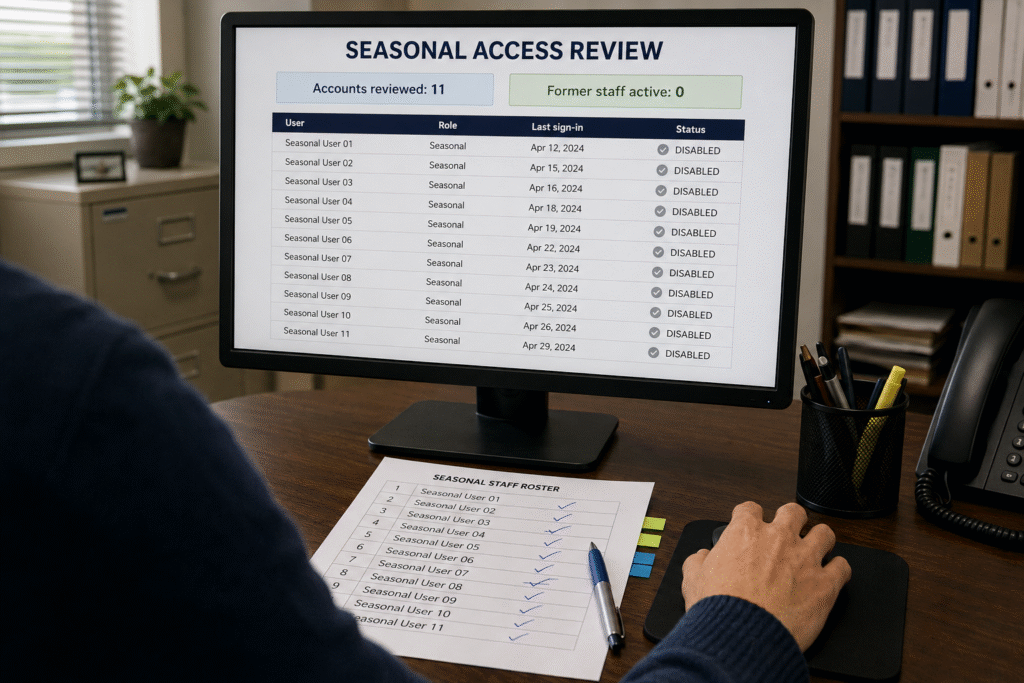
One firm was issuing seasonal staff shared credentials, reused across multiple preparers, still active in June after everyone had gone home. Not malice. Nobody’s assigned job.
We moved them to individual accounts with MFA, access that expires on a date rather than on someone remembering, and a monthly review of who still has a login. It took about a week.
The measurable result: at the end of that season, zero active accounts belonged to people no longer working there. The prior year it was 11.
That is not a technology problem. It is a process problem that technology enforces once someone sets it up.
What good IT support for accountants looks like at 5 to 25 people
- Tax and accounting software hosted somewhere with real uptime commitments, not a tower under a desk
- Individual logins with MFA for everyone, seasonal staff included
- Access that expires on a date rather than on memory
- Encrypted client portals for document exchange instead of emailed attachments
- Full-disk encryption on every laptop that leaves the office
- Daily backups with a documented, tested restore covering software data, documents, and email
- Monitoring on any remaining onsite hardware so drive failures announce themselves in November rather than April
- A written information security plan that matches what the firm actually does
- A defined busy-season response commitment in writing
Most firms have five or six of these and believe they have all nine.
The honest cost conversation
Firms ask what this should cost. It depends on headcount, how much stays onsite, and your compliance obligations, which is why anyone quoting before seeing your setup is guessing. We wrote up how the pricing models work and where the surprise charges hide in a separate post on what IT support costs.
What we can say plainly: the cost of getting this right is smaller than one lost day in April. Run that against your own billable hours and you will land in the same place we do.
The three questions to ask a prospective provider
Firms evaluating IT support for accountants tend to compare monthly rates. These three questions separate providers who understand the seasonal shape of your business from those who will treat you like any other twenty-person office.
What is your response commitment between January 15 and April 15, and is it different from the rest of the year? A provider who has not thought about this will give you one number. A provider who works with firms will already have a seasonal answer, and will put it in the agreement.
Will you schedule infrastructure work around our calendar, in writing? The answer you want commits to a window, May through August, and treats February work as emergency-only.
Can you help document the technical controls in our security plan? Not write the plan, which is a compliance and legal exercise, but confirm that what the plan claims is actually configured. A provider who cannot speak to MFA coverage, access reviews, and encryption status is not going to be useful when someone asks for evidence.
If a provider answers all three specifically, the rest of the comparison gets easier.
What we usually find in a first assessment
Consistent enough to list. None of these are unusual and none reflect badly on a firm; they are what happens when a practice grows faster than its systems were designed for.
The backup nobody has restored from. By a wide margin the most common finding, and the one with the largest consequence in April.
MFA on most accounts. Most is the word that does the damage. Attackers do not try every account, they try until one works, and the exempted account is usually a senior one.
Seasonal credentials still live in the summer. Covered above, and it repeats at firm after firm.
One machine holding something important that is not backed up. Usually a desktop running an older application, or a local QuickBooks file that never moved when everything else did.
No inventory. Nobody can produce a list of every place client data lives. That list is the foundation of a security plan, and building it is usually the first real deliverable of an assessment.
Frequently asked questions
When should we schedule an assessment? Between May and October. An assessment in February produces a list of things you cannot act on for two months.
Does our tax software vendor’s backup count as our backup? Usually not on its own. Vendor retention windows are often shorter than firms assume, restores happen at the vendor’s pace, and coverage is typically the platform’s own data rather than the documents and email around it. Ask for the retention period in writing.
Do we need a WISP if we only prepare a few returns? The obligation attaches to handling taxpayer information, not to volume. Firm size is not an exemption. Confirm your specific situation with counsel.
Is cloud hosting for tax software worth it? For most firms this size, yes, mainly because it removes the single-point-of-failure server and shifts uptime onto someone with a commitment to it. The trade is that you become dependent on your internet connection, which is worth planning a backup for.
What about seasonal staff on their own laptops? Either issue firm-controlled devices or require enrollment, encryption, and MFA before granting access. Unmanaged personal machines holding client financial data are difficult to reconcile with a written security plan.
Book a pre-season assessment
The right time to look at this is now, in the quiet months, not in February when nothing can be changed.
Our free network assessment covers what your obligations and your workflow actually require: access controls, MFA coverage, backup verification with a real restore test, and whether your written plan matches your practice. You keep the findings whether or not you work with us.
Call (201) 520-2025 or book your pre-season assessment.
Coban Computer Solutions has supported professional practices across Bergen, Hudson, and Passaic Counties since 2004, from our office in Midland Park.
Related reading:
- IT services for accounting firms
- What IT support costs a Bergen County business
- Small business data backup
- 12 questions every NJ business owner should be able to answer
External references: